WordPress 7.0 “Armstrong”: AI Moves Into Core, but What Does It Change for a Small Business?
 By Thierry Gustin
Updated
6 min read

Contents
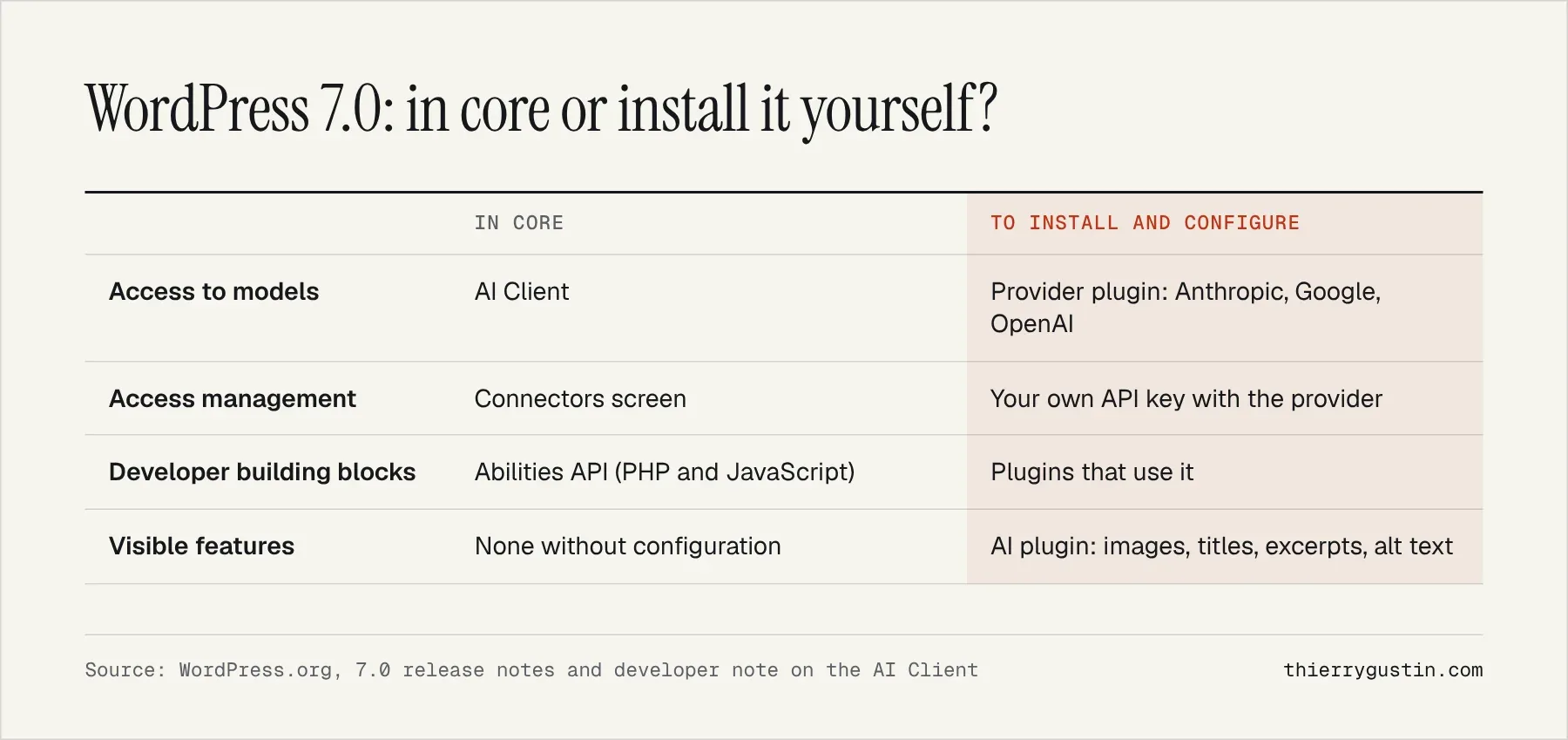
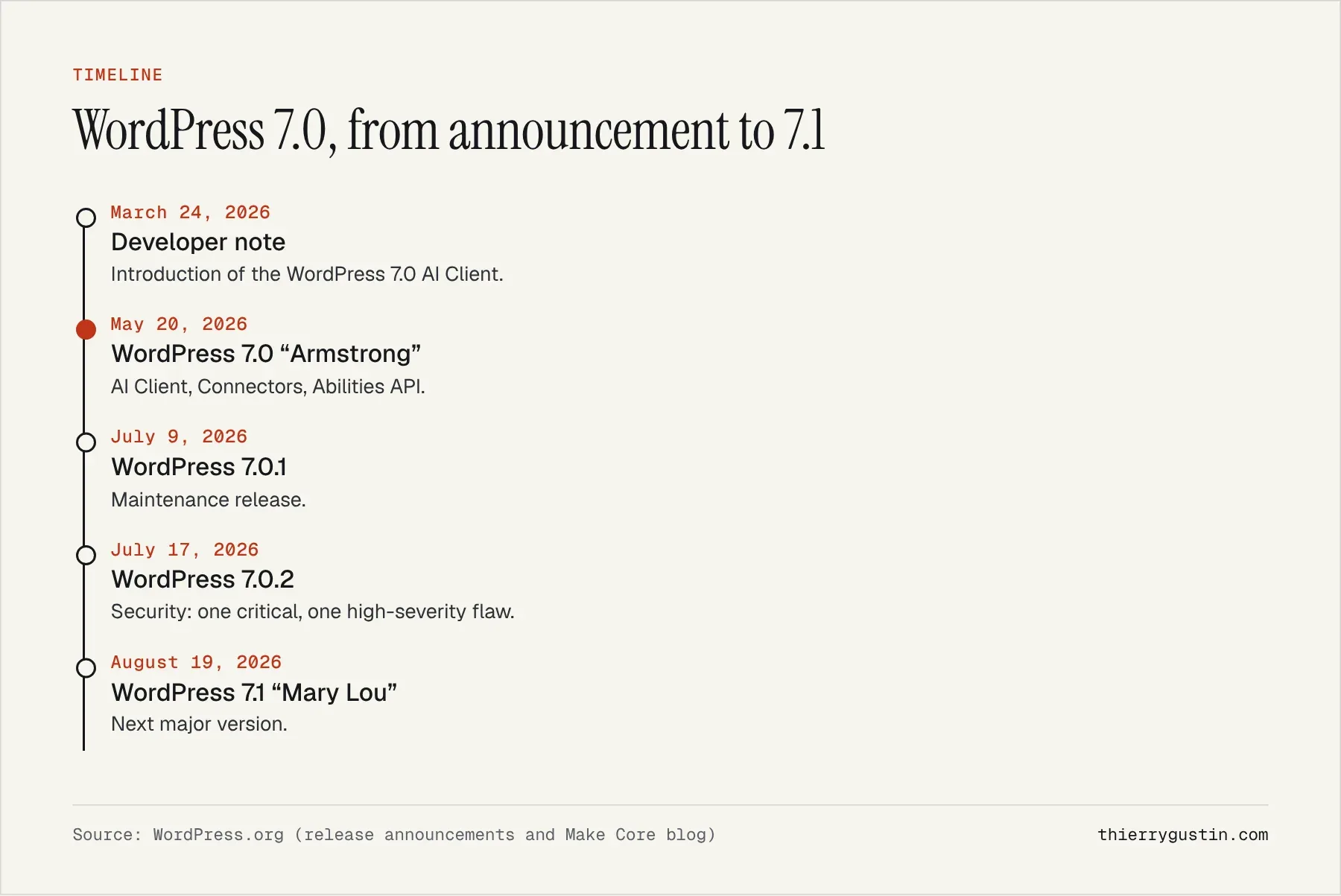
WordPress 7.0, released on May 20, 2026 under the name “Armstrong,” builds an artificial intelligence layer into its core for the first time: an AI Client that lets the CMS talk to generative models, and a “Connectors” screen to manage providers[1]. But core ships with no AI provider, and the visible features (generating an image, a title, an excerpt, alt text) come through a separate official plugin[1][2]. For a small business, nothing concrete happens on the AI side until someone configures a provider.
This matters because WordPress powers 39.4% of all websites, according to W3Techs[4]. For many small businesses in France and Spain, it's the tool behind their site, and two questions keep coming up: should we turn on AI, and does it help SEO? Here's my analysis, six months after the release.
What does WordPress 7.0 really bring in terms of AI?
The release notes describe three components[1]. The AI Client lets WordPress communicate with generative models. The Connectors screen centralizes external connections, with three presets and the option to add more. The Abilities API, paired with the client, serves as a foundation for new features, task automation and creative tools.
The developer note published in March on the core blog explains how it works[2]. The client is provider-agnostic: a plugin sends a request, and WordPress routes it to a model at whichever provider the site owner has configured. Core doesn't integrate any provider directly; three official plugins exist, for Anthropic, Google and OpenAI. API keys are managed under Settings → Connectors, and a filter lets developers block certain requests.
The release also brings everything else you'd expect from a major version: a redesigned admin interface, a keyboard-accessible command palette and new blocks (including Breadcrumbs and Icons), thanks to more than 875 contributors and more than 420 enhancements and fixes[1].
Does WordPress 7.0's AI help SEO?
Not directly, and it's worth being clear about this. Generating a title or an excerpt faster doesn't make a page more useful. On the contrary, the guide Google published on May 15 stresses non-commodity content, the kind that offers something a thousand other pages don't[3]; I analyze it in my article on that guide. An excerpt generated from generic text will stay generic, however quickly it was produced.
Image alt text is the most interesting case. Many small business sites lack it; an automatic suggestion is better than an empty field, provided you review it, because this text primarily serves people with visual impairments and should say what the image brings to the page, not just what it shows.
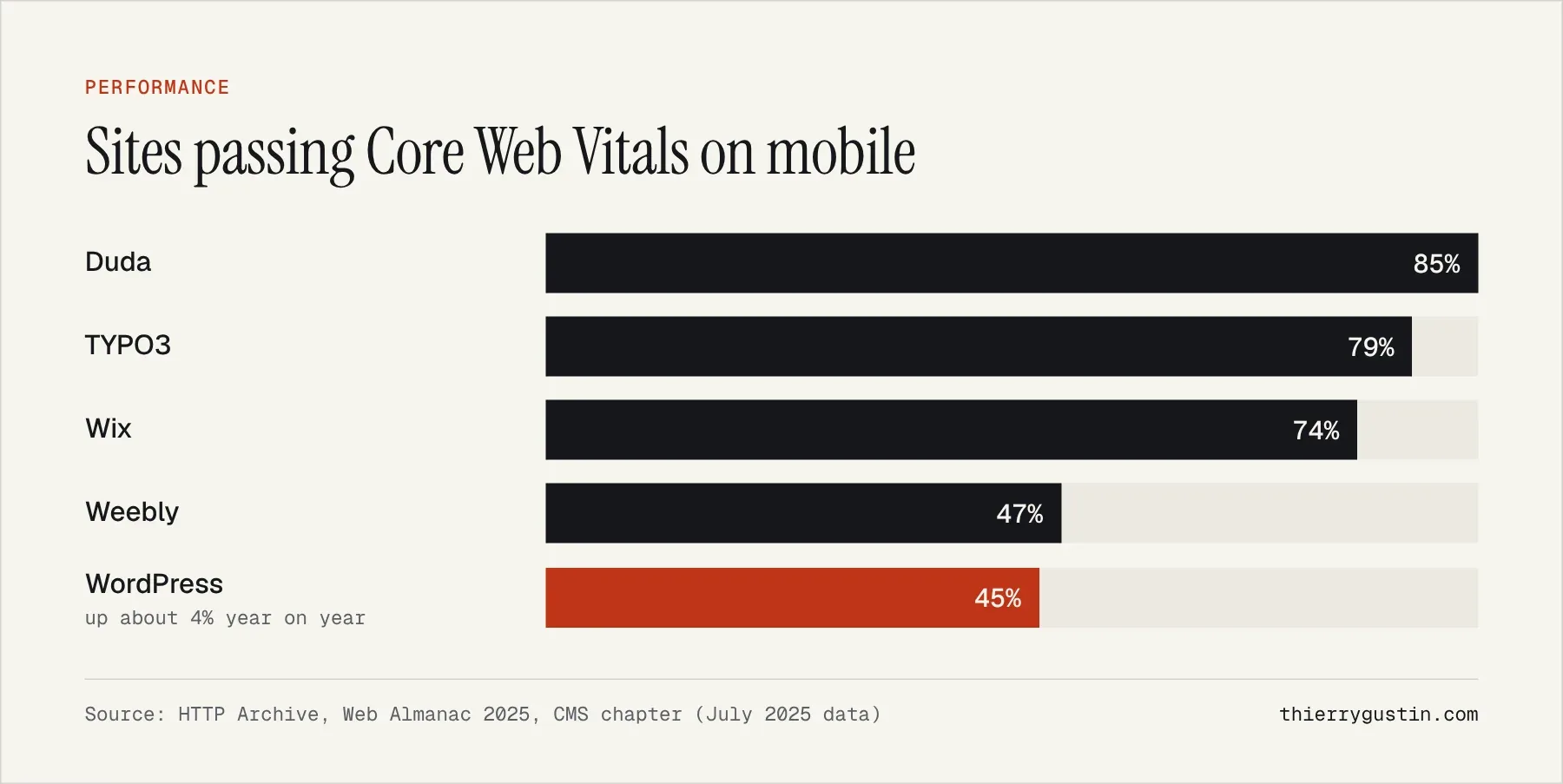
The real SEO lever for a WordPress site lies elsewhere: performance. According to HTTP Archive's 2025 Web Almanac, only 45% of WordPress sites pass all three Core Web Vitals on mobile, one of the lowest rates among the CMSs studied[5]. No AI feature fixes that problem; a lighter theme and fewer plugins, on the other hand, do.
What are the security and data risks?
AI features arrive through plugins, and that's where vulnerabilities concentrate. Patchstack recorded 11,334 new vulnerabilities in the WordPress ecosystem in 2025: 91% in plugins, 9% in themes, and only 6 in core[6]. Every AI plugin you add is one more component to keep up to date.
The 7.0 branch proved the point: version 7.0.2, released on July 17, fixed one critical and one high-severity vulnerability, with a recommendation to update immediately[7]. On a business website, automatic security updates aren't optional; they're the bare minimum.
On the data side, one common-sense precaution: when an AI feature is used, the text or image involved is sent to the chosen provider. For a European business, that raises the usual GDPR questions (which provider, which data, which contract) and a budget question, since usage runs through your own API key. Settle these points before you switch anything on, not after the first content has already been sent.
My take: sound architecture, not a revolution for small businesses
WordPress's technical choice is sound: a common layer in core, interchangeable providers, features delivered as plugins, and centralized key management. Plugin developers no longer have to handle credentials themselves, which is good for both security and consistency.
For a small business, the immediate benefit remains limited. The gain is editorial convenience: a few minutes per article on a title, an excerpt or alt text. What wins or loses customers on a website is still speed, security, clear service pages and content quality.
For a brochure site or a blog that doesn't need WordPress's plugin ecosystem, a lighter solution may be enough; that's why I created Éclair CMS, which runs without a database. For a large online store, a site that depends on industry-specific plugins or a team already trained on it, WordPress remains a solid choice.
What should you actually do?
- Stay on the latest version of the branch (7.1 since August 19[8]) and check that security updates are applied automatically.
- Only turn on AI for a specific need, such as alt text, with a provider you've chosen with full knowledge of the terms.
- Have everything generated reviewed before publishing, especially titles and excerpts that show up in Google.
- Take stock of your plugins: each one has to earn its place.
- Measure mobile performance before looking for gains elsewhere.
Taken in this order, these steps cost little and protect what matters most to your business. AI can come afterward, as a convenience tool that saves a few minutes, not as an SEO strategy.
Frequently asked questions
Does WordPress 7.0 send my content to an AI without my consent?
According to the WordPress documentation, core doesn't include any AI provider: you have to install a provider plugin (Anthropic, Google or OpenAI, for example) and configure a key in the Connectors screen. Without that setup, no AI feature can be used. Do, however, check what the third-party plugins already installed on your site are doing.
Do I have to pay to use AI in WordPress 7.0?
WordPress and its AI Client are free, but the models aren't: usage runs through an API key with the provider you choose, which bills according to its own terms. For a few alt texts or excerpts a month, the cost stays modest; still, set a spending cap with the provider.
Does WordPress AI improve SEO?
Not directly. It saves time on titles, excerpts and alt text, but Google rewards helpful, non-commodity content, not the way it was produced. On a WordPress site, mobile performance and the quality of your service pages carry far more weight than turning on AI.
Should I upgrade to WordPress 7.0?
Today, the real question is upgrading to the latest available version: WordPress 7.1 came out on August 19, 2026, and the 7.0 branch received a critical security fix in July. Test on a staging copy of your site first, check that your theme and plugins are compatible, then update without delay.
Sources
- WordPress.org, “WordPress 7.0 Armstrong” (May 20, 2026)
- Make WordPress Core, “Introducing the AI Client in WordPress 7.0” (March 24, 2026)
- Google Search Central, guide to optimizing for generative AI features (May 2026)
- W3Techs, WordPress market share (data as of November 9, 2026)
- HTTP Archive, Web Almanac 2025, CMS chapter
- Patchstack, “State of WordPress Security in 2026”
- WordPress.org, WordPress 7.0.2 (July 17, 2026)
- WordPress.org, release announcements (7.0.1, 7.1)
Read next

My Vision of SEO and GEO for 2027: Seven Theses and an Action Plan
SEO in 2027: my vision of SEO and GEO in seven sourced theses, the 2026–2027 timeline and the action plan small businesses should start right now.