WordPress 7.1 “Mary Lou”: What the August 2026 Release Changes for Your Website
 By Thierry Gustin
Updated
6 min read
Contents
WordPress 7.1, named “Mary Lou” and released on August 19, 2026, is a tooling release rather than a breakthrough: per-screen-size styles without CSS, a new media editor, native support for AVIF, HEIC and HDR, and above all image processing directly in the browser[1]. It adds no built-in AI feature; it extends the Abilities API, the building block that lets AI tools drive WordPress. For a small business, the most tangible gain concerns images and server load.
WordPress powers 39.4% of all websites according to W3Techs as of November 9, 2026[7]. Most of my clients use it, and I owe them an honest reading of every release: what really changes, what is just marketing, and what to do before clicking “Update”.
What's new in WordPress 7.1?
The release brings together more than 800 contributors, including more than 170 first-time contributors, and more than 1,500 enhancements and fixes[1]. On the layout side, you can now adjust a block's appearance by screen size, in global styles or in the block settings, without writing CSS. Block themes can define their own breakpoints for mobile and tablet.
Two new blocks arrive, Tabs and Playlist, along with separate hover and focus styles for buttons. In the admin, a modal media editor replaces the old cropping tool: free or aspect-ratio cropping, rotation, flipping and metadata editing[1]. These are real usability gains for teams that publish their own content.
Why does in-browser image processing matter?
It is the most technical new feature, and in my view the most useful one. According to the announcement, compression, resizing and thumbnail generation now run in the browser, thanks to a WebAssembly build of the libvips library[1]. In practice, the computer of the person uploading the image does the work, no longer the server.
My interpretation, to be checked on each hosting plan: on shared hosting, where server resources are limited, this reduces failed uploads and load spikes when heavy images are added. The announcement also mentions progress indicators and automatic upload retries, as well as optional conversion of GIFs to video, which is usually lighter.
Native AVIF and HEIC support matters too. HEIC is the iPhone photo format; a retailer who photographs products with a phone will no longer have to convert them before publishing. A word of caution, though: accepting a format is not the same as optimizing it. The final file size still depends on your settings and your theme.
Does WordPress 7.1 make your site faster?
Not automatically. The release mainly lets you configure the defaults for speculative loading, which preloads the pages a visitor is likely to open next, through environment variables or constants[1]. Your host can therefore tune it without a plugin. The announcement gives no figure for speed gains.
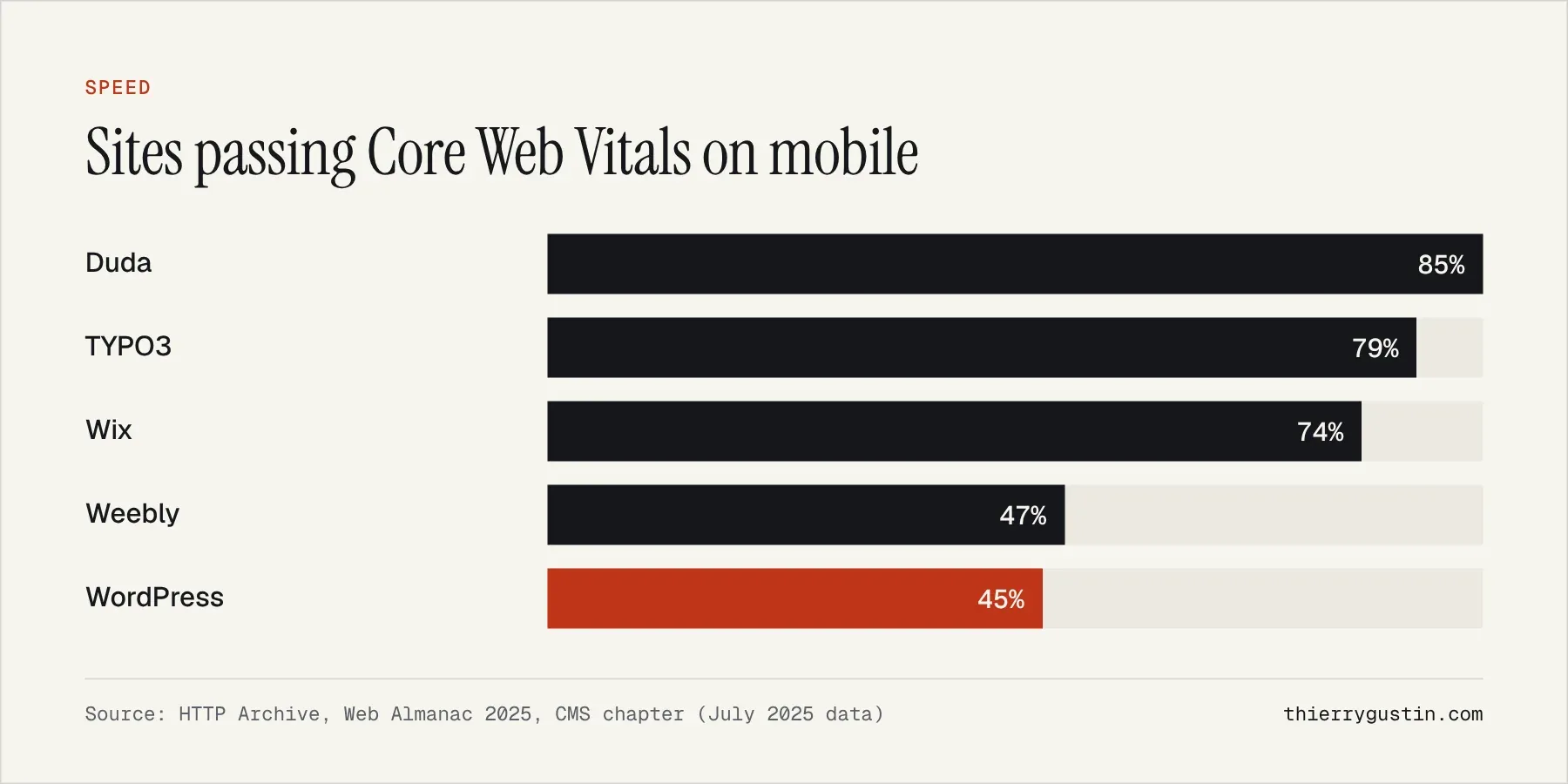
The starting point remains modest. According to HTTP Archive's 2025 Web Almanac, based on July 2025 data, only 45% of WordPress sites pass all three Core Web Vitals on mobile, one of the lowest rates among the CMSs studied[5]. The median WordPress page weighs 2,894 KB on mobile, including 638 KB of JavaScript.
What makes the difference is caching. The public benchmark I published on November 8, 2026 to compare Éclair CMS with other tools also measures WordPress 7.1.4 on its own: on a small server with 2 virtual CPUs, an article page responds in 75.64 ms without a caching plugin and in 1.80 ms with Cache Enabler[6]. These are lab measurements, produced by the author of a competing CMS, but the order of magnitude is unequivocal.
| WordPress 7.1.4, article page | Median response time | Requests per second |
|---|---|---|
| Without a caching plugin | 75.64 ms | 31 |
| With Cache Enabler | 1.80 ms | 1,060 |
What about AI in WordPress 7.1?
There is no new visible AI feature in 7.1. The announcement mentions AI only once, about the Abilities API: it gets a filterable execution lifecycle, custom validation and shared discovery, which makes it easier to build AI-powered tools[1]. This is a change for developers, laying the groundwork for plugins that let an assistant take action on the site.
The real AI features date back to May, with the AI client built into core and the connectors screen in WordPress 7.0. I analyzed them in the article on WordPress 7.0 and AI; 7.1 doesn't change them for end users.
Which security releases surrounded 7.1?
August was also a maintenance month: WordPress 7.0.3 on August 6 with several security fixes, then 7.0.4 on August 12 with one more fix[2]. The 7.1 branch then received its own updates, up to 7.1.4 on October 28[9]. On August 13, WordPress had also launched an official extension for Chrome and Safari, with no AI, that gives quick access to the admin and to preview tools[3].
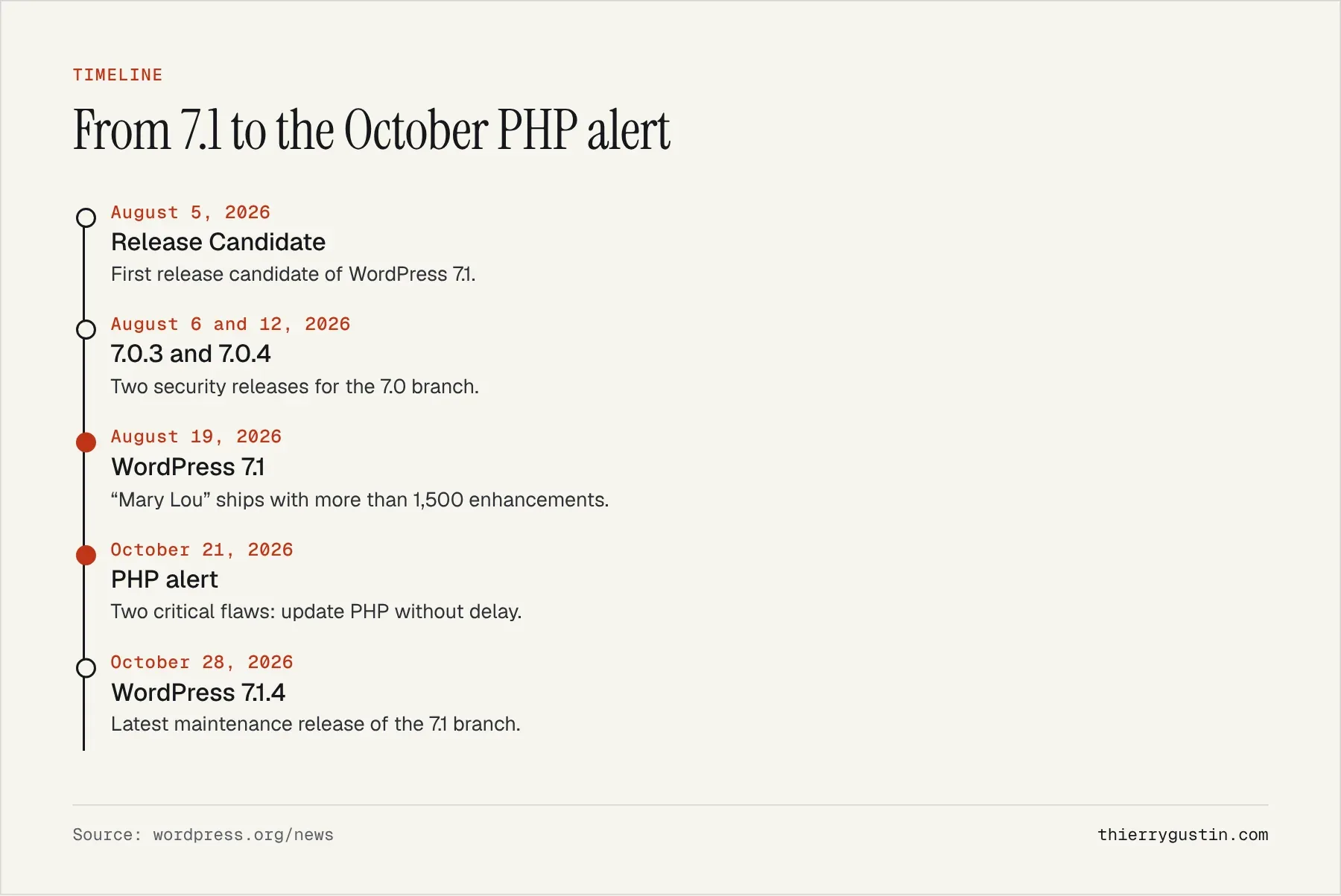
The most serious event came on October 21: WordPress relayed two critical PHP vulnerabilities, reminding users that PHP versions older than 8.2 no longer receive security fixes[4]. No WordPress update was needed, but PHP had to be updated. The main risk, moreover, still lies in the ecosystem: of 11,334 vulnerabilities recorded in 2025, Patchstack attributes 91% to plugins, 9% to themes, and only 6 to WordPress core[8].
My take
WordPress 7.1 is a good release, without the hype. In-browser image processing and no-code responsive styles address real small-business problems. But it doesn't change the underlying equation: the speed and security of a WordPress site depend first on caching, the theme, the installed plugins and the PHP version, not on the core version number.
For a small brochure site that needs neither a database nor dozens of plugins, other architectures exist that are lighter to maintain. For a site that relies on the WordPress ecosystem, on WooCommerce or on a team used to the editor, staying on an up-to-date WordPress is often the most sensible choice.
What should you do in practice?
- Check your PHP version: WordPress recommends PHP 8.3 or higher[10], and nothing below 8.2 receives fixes.
- Update a test copy (staging) before the live site, especially if you use a page builder.
- Test image uploads from the computers you normally use, including HEIC photos taken with a phone.
- Check that a caching plugin is active, then measure your Core Web Vitals in Search Console.
- Take stock of your plugins and remove the ones you no longer use.
Frequently asked questions
What's new in WordPress 7.1?
WordPress 7.1 “Mary Lou”, released on August 19, 2026, brings per-screen-size styles without CSS, the Tabs and Playlist blocks, a new media editor, native support for AVIF, HEIC and HDR, in-browser image processing, and a speculative loading setting that hosts can configure.
Does WordPress 7.1 include artificial intelligence?
No user-facing AI feature. WordPress 7.1 extends the Abilities API, which makes it easier to build AI tools that can act on the site. The AI client and the connectors screen arrived with WordPress 7.0 in May 2026; content generation goes through a separate official plugin.
Should I update to WordPress 7.1 right away?
Yes, after testing on a copy of the site. Recent versions receive security fixes, and the 7.1 branch had reached 7.1.4 by late October 2026. Above all, check that your theme and plugins are compatible, and use the opportunity to check your PHP version.
Does WordPress 7.1 improve Core Web Vitals?
Not directly. It makes lighter image formats and speculative loading tuning easier, but no measured gain has been announced. In 2025, only 45% of WordPress sites passed all three Core Web Vitals on mobile. Caching, the theme and plugins matter far more than the core version.
Sources
- WordPress.org, “WordPress 7.1 ‘Mary Lou’” (August 19, 2026)
- WordPress.org, August 2026 news (7.1 RC1, 7.0.3, 7.0.4)
- WordPress.org, official browser extension (August 13, 2026)
- WordPress.org, critical PHP security alert (October 21, 2026)
- HTTP Archive, Web Almanac 2025, CMS chapter
- Éclair CMS public benchmark, WordPress 7.1.4 and Kirby (November 8, 2026)
- W3Techs, WordPress market share (November 9, 2026)
- Patchstack, “State of WordPress Security in 2026”
- WordPress.org, WordPress 7.1.4 (October 28, 2026)
- WordPress.org, requirements
Read next
My Vision of SEO and GEO for 2027: Seven Theses and an Action Plan
SEO in 2027: my vision of SEO and GEO in seven sourced theses, the 2026–2027 timeline and the action plan small businesses should start right now.