September 2026: Search Console Finally Measures Image-Based Searches
 By Thierry Gustin
Updated
7 min read

Contents
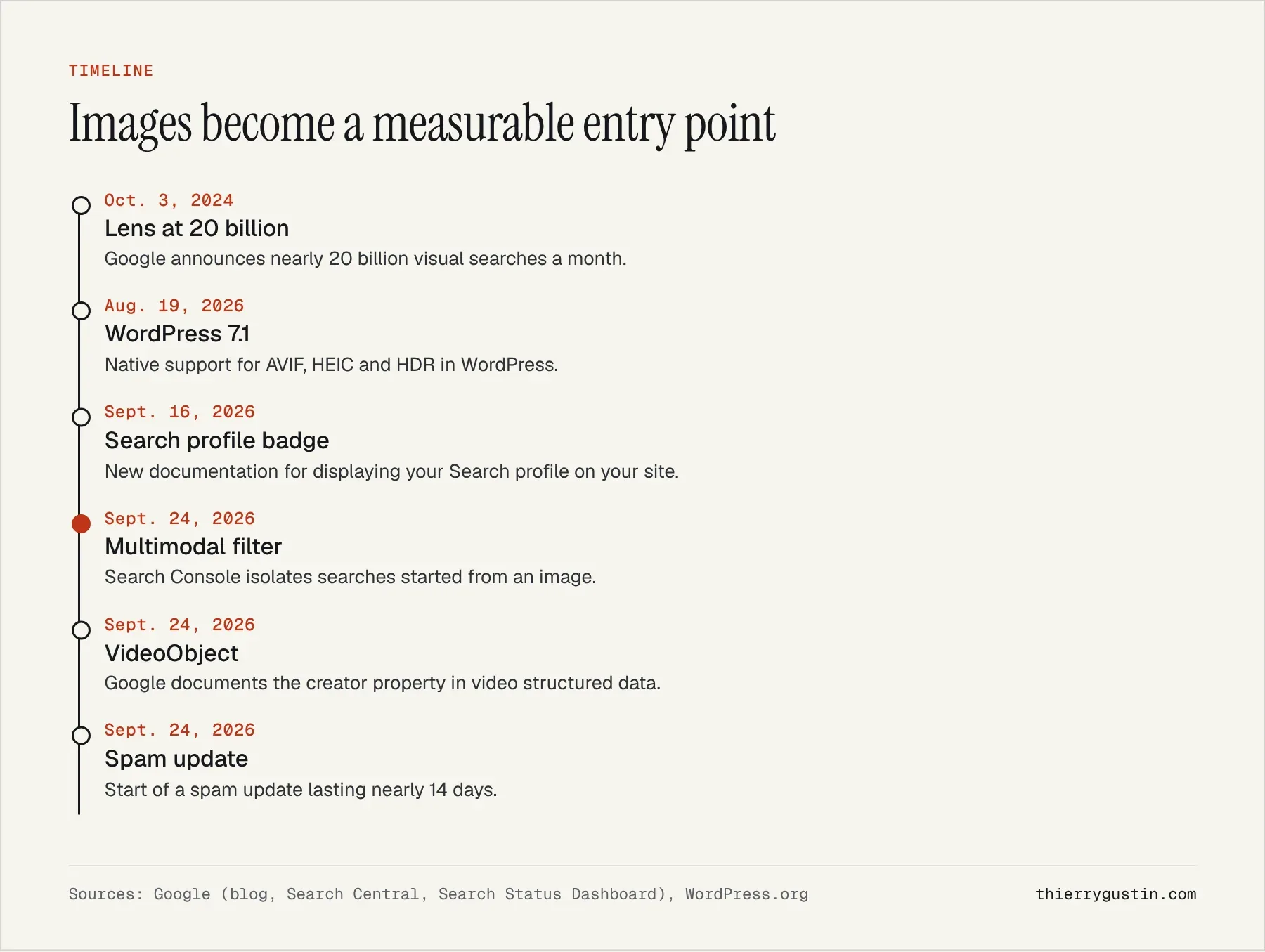
Google Lens traffic can finally be measured. Since September 24, 2026, Search Console has offered a “multimodal search” filter that isolates visits coming from a search started with an image: Google Lens, Circle to Search on Android, an image uploaded to Google, or the right-click “Search this image” option in Chrome[1]. For an online store, a hotel or a craftsperson whose products photograph well, it is the first time you can know how many customers arrive through the camera rather than the keyboard.
This is not a marginal issue. In October 2024, Google was already saying that Lens was used for “nearly 20 billion visual searches every month”, and that Circle to Search was available on more than 150 million Android devices[2]. For two years, those searches blended into the rest of the statistics. Looking back from November, here is what the new filter lets you do, what it does not, and how to prepare your images.
What is multimodal search in Search Console?
Google uses the term “web multimodal search” for searches that start from an image. The September 24 post, signed by Harsh Kharbanda (Google Lens) and Moshe Samet (Search Console), gives the full list: Lens, Circle to Search, uploading an image to Google Search, and Chrome’s right-click feature[1].
The data shows up in two places: the search results Performance report and the generative AI features report. You get it through a new search type filter, and you can export it to combine with other tools. The rollout is global, but one detail matters: the metrics only appear if your site actually receives traffic from these searches[1]. An empty report is therefore not a bug, it is information.
Why does Google Lens traffic matter for a small business?
Image search is high-intent search. People photograph a chair they saw at a friend’s place, a spare part, a hotel facade, a plant, a wine label. The implicit question is almost always “what is this and where can I buy it?” That is the moment when a well-prepared site wins a customer that a keyword would never have brought, because the customer did not know the product’s exact name.
The filter also arrives in the generative AI features report. That is consistent with how Google is evolving: the search box accepts images, and a photo can trigger an AI-written answer. Your image can therefore become the source of an answer, not just a result in Google Images. I introduced that AI report in my article on Search Console’s generative AI performance report.
A word of caution: neither Google nor any source I consulted gives the share of these searches that ends in a click to a website. The 20 billion figure dates from 2024 and describes Lens usage, not traffic sent to websites. Your own data will tell you more than any average.
How should you read the new data?
I recommend three readings, in this order. First, volume: what share of your total clicks comes from multimodal search? If it is zero on a catalog of visual products, that is a red flag about how your images are indexed.
Next, pages: which ones receive this traffic? In e-commerce, it is often specific product pages rather than categories. In hospitality, it might be a room or restaurant page. Compare them with your most visited pages in traditional search: the gaps show where your images are working, and where they are asleep.
Finally, queries, with a caveat. An image search does not always involve typed text, and Google’s post does not explain what the queries column shows in that case. I therefore prefer to steer by page and by country rather than by query, and I suggest exporting the data every month to build your own history.
Also keep the context of the period in mind. A spam update started on September 24, the same day as the new filter, and lasted 13 days and 16 hours according to Google’s dashboard[5]. If your graphs move at the end of September, do not mix up the two topics.
Which images can Google read?
Google’s documentation on images is precise and little known[3]. Google supports BMP, GIF, JPEG, PNG, WebP, SVG and AVIF, provided the image sits in an img element with a src attribute. An image set as a CSS background is not indexed: “Google doesn’t index CSS images”. On many brochure websites, the best photos are precisely CSS backgrounds.
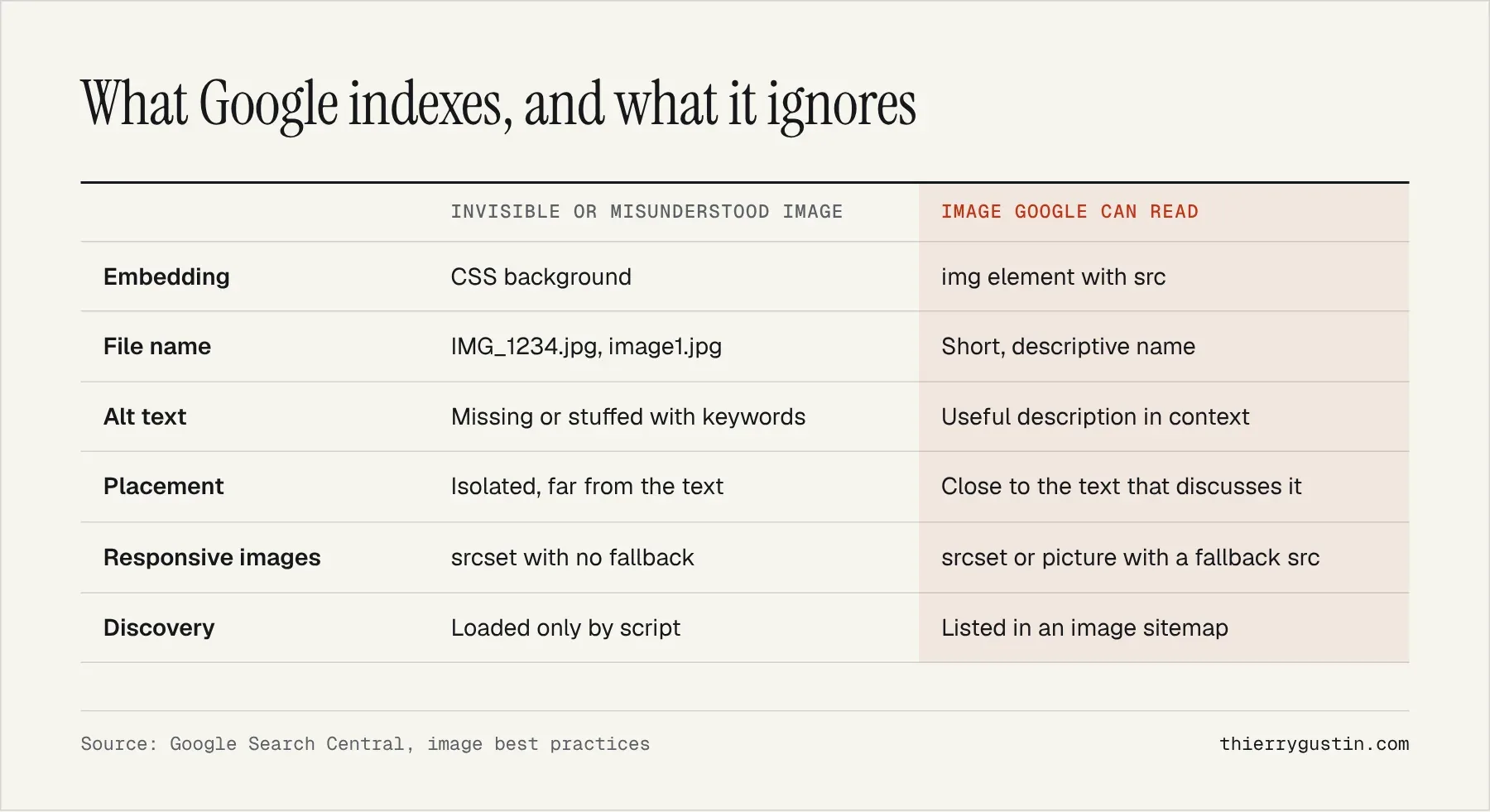
Alt text deserves a word. Google gives an example of a progression: no alt attribute is bad, “puppy” is better, “Dalmatian puppy playing fetch” is the right level. It also warns that keyword stuffing in alt text can result in the site being seen as spam[3]. Describe what the photo shows, as you would to someone who cannot see it.
On the video side, Google’s documentation added the creator property to VideoObject on September 24, with author still accepted[4]. If you publish demo videos or virtual tours, now is the time to complete that markup.
My take
This is one of the most useful September announcements for small businesses, and one of the least discussed. For years, image optimization was the poor relation of SEO: you compressed for speed, filled in the alt text to tick a box, and measured nothing. Having a number changes the conversation with a business owner.
I remain measured, though. The filter does not say why Lens picks an image, and it only measures clicks and impressions, not what the AI does with your photo. For many service businesses, the volume will be small. For e-commerce, tourism, home decor, fashion, food or technical parts, on the other hand, it is a metric worth tracking right now.
One last technical point: images are often the heaviest part of a page, as Google points out[3]. WordPress 7.1 has supported AVIF natively since August[6], which makes things easier; I discuss it in my article on WordPress 7.1. A modern format is still no substitute for a good file name and good alt text.
What should you actually do?
Here is the checklist I use, starting with measurement.
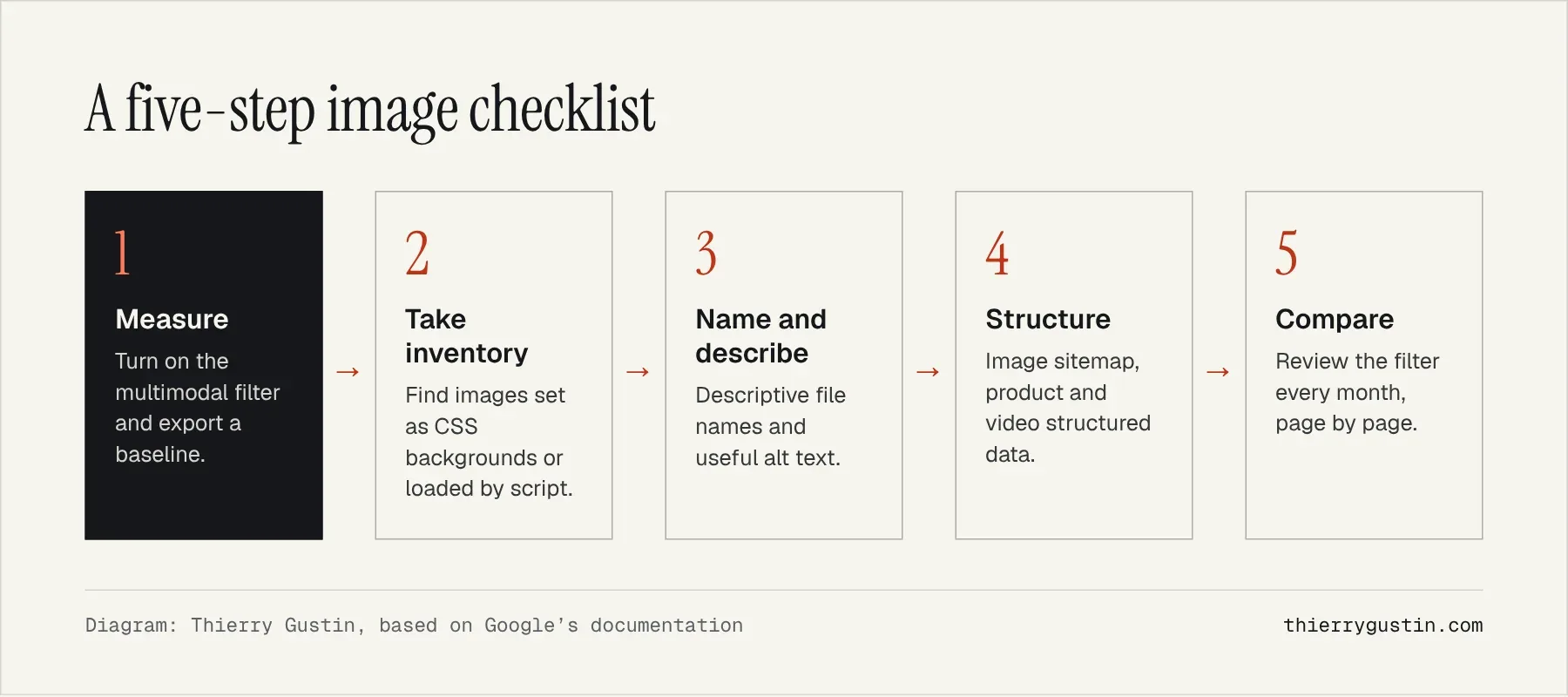
Start with the inventory. A crawler such as Arachnide SEO Spider lets you list the images on your pages, their alt attributes and their file names. Product or room images that do not appear in the HTML are the first candidates for fixing.
Deal with the pages that sell first. Product pages, room pages, portfolio pages, menus: these are what a customer photographs and searches for. One original, sharp, well-described image is worth more than ten stock photos that Lens will find everywhere else.
Connect the image to the text. Google recommends placing images near the text that describes them[3]. The product name, reference, price and availability next to the photo help Lens as much as they help the visitor.
Frequently asked questions
Where can I find Google Lens traffic in Search Console?
In the search results Performance report, or in the generative AI features report, choose the new multimodal search type filter, available since September 24, 2026. It covers Google Lens, Circle to Search, images uploaded to Google and Chrome’s “Search this image” feature. The data can be exported for analysis elsewhere.
Why does the multimodal filter show no data for my site?
Google says the metrics only appear if your site receives traffic from these image searches. An empty report therefore means your pages are not being found this way. Check that your images are in indexable img elements, not CSS backgrounds, with descriptive file names and alt text.
Does Google support the AVIF format?
Yes. Google’s image documentation lists AVIF among the supported formats, along with BMP, GIF, JPEG, PNG, WebP and SVG. The format matters less than the embedding: the image must be referenced in an img element with a src attribute, and the file extension must match its actual type.
Do image searches matter for a service business?
Less than for an online store, but not zero. An architecture firm, a landscaper, a restaurant or a tradesperson can be found through a photo of a project or a place. The new filter will tell you: check it for a few months before deciding whether to invest time in it.
Sources
- Google Search Central Blog, Harsh Kharbanda and Moshe Samet, multimodal search in Search Console (September 24, 2026)
- Google, what’s new in Lens and Search (October 3, 2024)
- Google Search Central, image SEO best practices
- Google Search Central, documentation updates log (September 2026)
- Google Search Status Dashboard, ranking updates history
- WordPress.org, WordPress 7.1 “Mary Lou” (August 19, 2026)
Read next

My Vision of SEO and GEO for 2027: Seven Theses and an Action Plan
SEO in 2027: my vision of SEO and GEO in seven sourced theses, the 2026–2027 timeline and the action plan small businesses should start right now.